What it does Use cases Install Community FAQ GitHub ↗
CK PDF Unlocker Logo

Free Windows Desktop App

Stop re-entering passwords on PDFs you already own

Remove open passwords and copy/print restrictions from PDF files — safely, locally, and without touching your originals.

⚠️ This app does not crack or recover passwords. It is designed solely to eliminate the hassle of re-entering a known password every time you open a PDF you already have legitimate access to.
Latest Version: ... GitHub Downloads: ... 🛡️ .exe — Verify on VirusTotal ↗ 🛡️ .msi — Verify on VirusTotal ↗
GitHub downloads
100%Offline — no uploads
FreeNo subscription ever
0Originals modified
BatchUnlimited files at once
Win 10/11Native desktop app

100% Free — in every sense of the word

No gotchas, no upsells, no expiry date.

Completely free
No payment, no subscription, no trial
Offline
Your file never leaves your device
No registration
No account, no email, no credit card
No ads
Clean, distraction-free interface
No malware or spyware
Open-source build process, source available on request
No expiry
Download once, use forever
No watermark
Absolutely no restrictions on output
Commercial use allowed
Use it for your business without restrictions
Original files untouched
A new _unlocked.pdf is always created

Two kinds of PDF restrictions — both removed

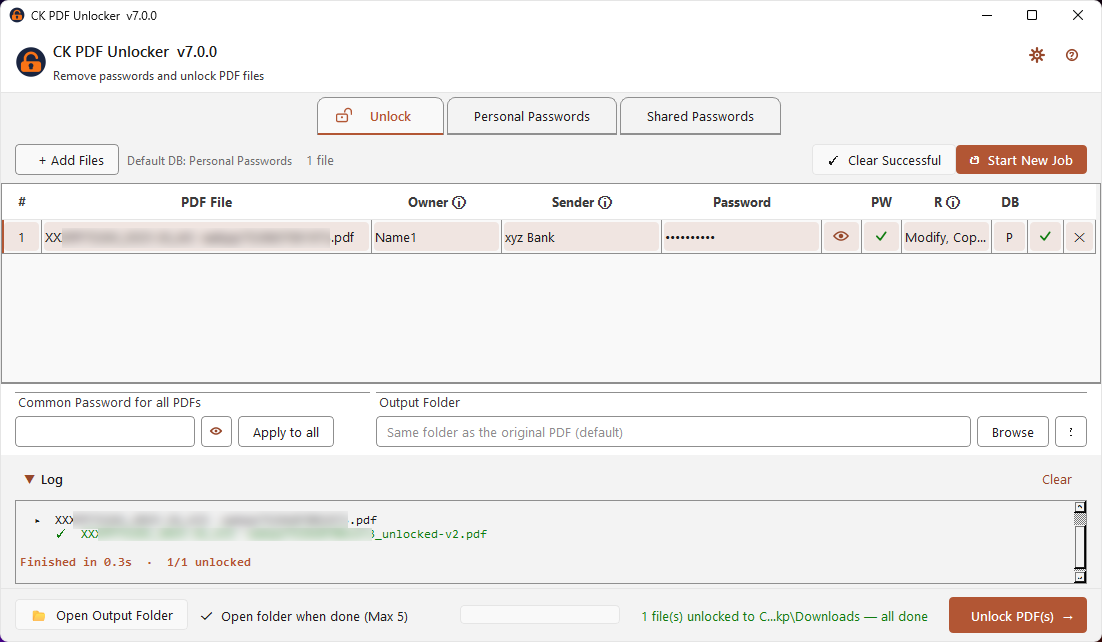
Your original file is never modified. CK PDF Unlocker always creates a new filename_unlocked.pdf alongside the original.

RestrictionWhat it meansAfter unlocking
Open passwordYou're prompted for a password just to open the fileFile opens freely
Copy / print restrictionsFile opens but you can't copy text, print, or editAll restrictions lifted

Three steps to an unlocked PDF

No setup, no configuration. For files with copy/print restrictions only — leave the password blank and click Unlock.

01
Launch the app and add your PDFs
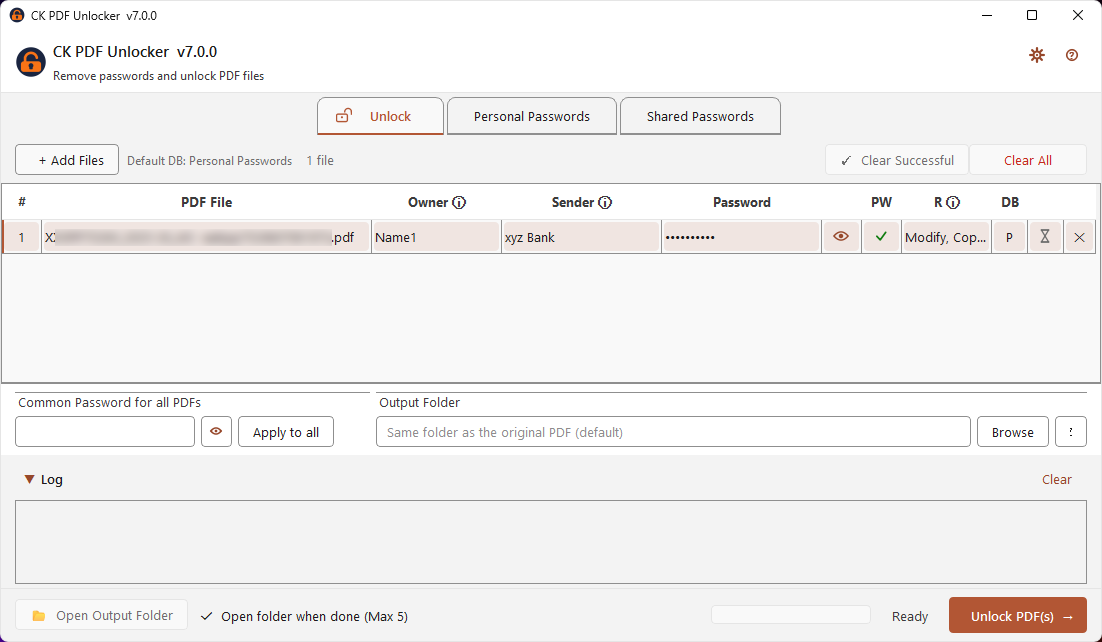
Click + Add Files, drag and drop PDFs into the window, or double-click the file list area. Add as many files as you like.
02
Enter passwords (if needed)
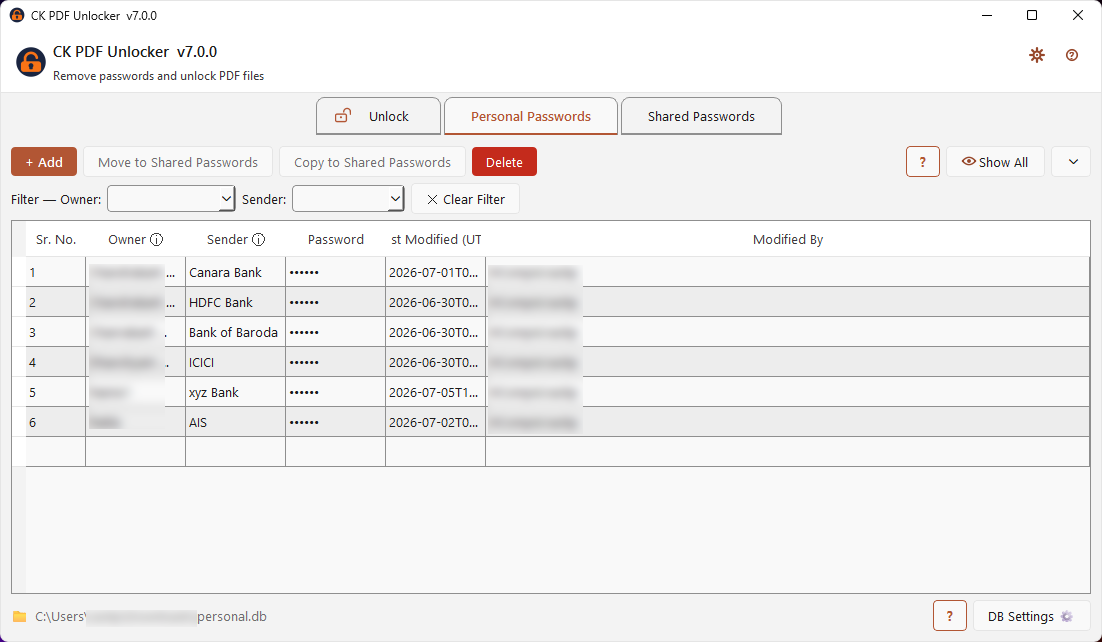
Enter each file's password in the Password column — or use the Global Password field if all files share the same one. Leave blank for copy/print-only restrictions.
03
Click Unlock PDF
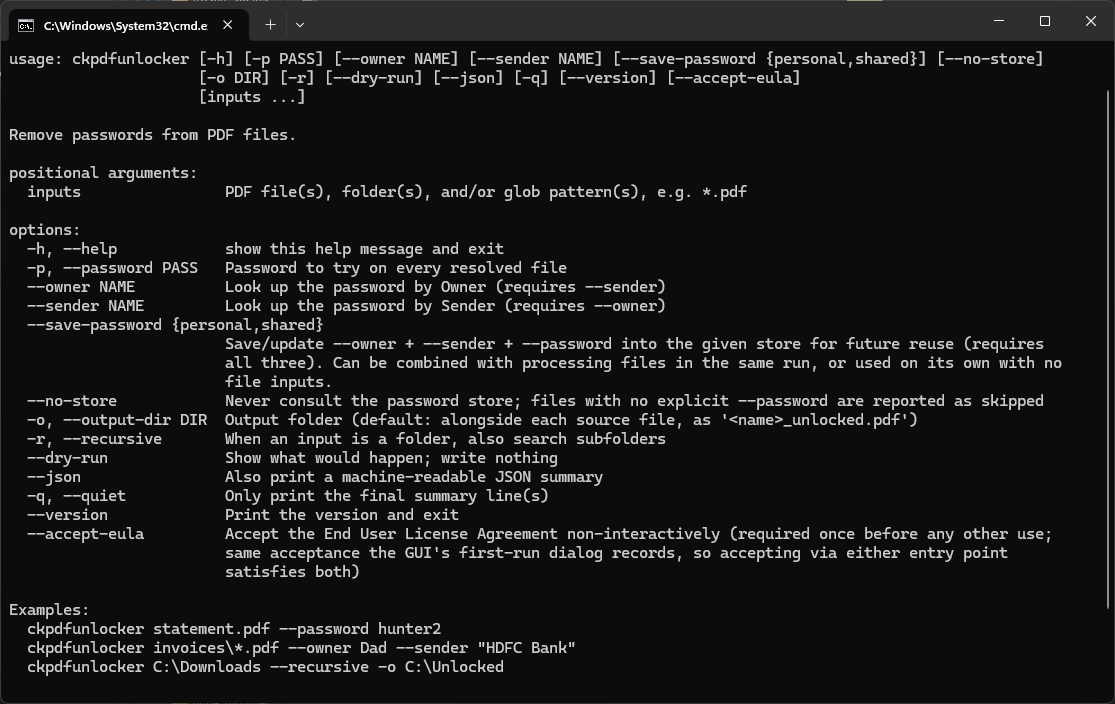
The unlocked copy is saved as yourfile_unlocked.pdf next to the original, or in a custom output folder you choose. Your original is never touched.
Original fileUnlocked file
statement_jan.pdfstatement_jan_unlocked.pdf
ITR_acknowledgement.pdfITR_acknowledgement_unlocked.pdf
salary_slip_march.pdfsalary_slip_march_unlocked.pdf

Anyone who gets locked PDFs they legitimately own

If you've ever had to dig up a password just to open a file you already own, this tool is for you.

🏦
Bank Statements
Banks routinely send monthly statements as password-protected PDFs. Unlock them all at once for easy archiving and sharing with your accountant.
🧾
Utility Bills
Electricity, water, gas, and broadband providers frequently email bills as protected PDFs. Unlock them to copy text for expense claims or print without restriction.
💼
Tax Documents & Government Records
Tax authorities and government agencies issue password-protected PDFs — acknowledgements, assessment notices, certificates.
🏠
Loan & Insurance Documents
Home loan statements, insurance policy documents, and premium receipts are routinely sent as locked PDFs.
💳
Credit Card Statements
Monthly credit card statements from most banks are password-protected. Process multiple months in a single run.
📊
Salary Slips & HR Documents
Many payroll systems generate password-protected payslips. Unlock them for easy reference during loan applications or tax filing.
🏥
Medical Records & Lab Reports
Diagnostic labs and hospitals sometimes send reports as restricted PDFs. Unlock to share easily with other doctors or insurance providers.
📚
Research Papers & Reports
Some research papers have copy restrictions that prevent highlighting or extracting quotes. Remove them to work with the content normally.
🏛️
Regulatory & Compliance Documents
Licences, certificates, and regulatory filings from government portals often come with restrictions — unlock for filing, printing, or archival.

Built for real workflows

A focused tool that does one job extremely well.

📂
Batch processing
Add as many PDFs as you like and unlock them all in one click.
🔑
Per-file passwords
Each file can have its own password, or use a single global password for all files.
🛡️
Original untouched
A new _unlocked file is always created. The original is never modified or deleted.
📁
Output folder control
Save unlocked files alongside originals, or choose a custom output folder.
⚙️
Dual engine
Uses pikepdf as the primary engine with qpdf as a fallback for maximum compatibility across all PDF encryption types.
🖱️
Drag and drop
Drag PDF files directly into the file list. No menus required.
🎨
Dark / Light / System theme
Choose your preferred theme — it's remembered across sessions.
🔔
Auto-update
Notified in-app when a new version is available, with one-click update.

Get it your way

Choose any one option below.

EXE installer (recommended)
⬇ Download ck-pdf-unlocker-setup-x64.exe
MSI installer — for enterprise / IT deployments
⬇ Download ck-pdf-unlocker-setup-x64.msi
⚠️ Windows SmartScreen warning on first run
When you first run the app, Windows may show a warning saying "Windows protected your PC". This is expected and completely normal for any new, independently distributed application — it does not mean the file is unsafe. This happens because the .exe is not yet code-signed with a commercial certificate.

To proceed: click More info → then click Run anyway.
If unsure, verify the file yourself at VirusTotal before running.
EXE installer
curl -L -o "%TEMP%\ck-pdf-unlocker-setup-x64.exe" https://github.com/epatels/ck-pdf-unlocker/releases/latest/download/ck-pdf-unlocker-setup-x64.exe && start /wait "" "%TEMP%\ck-pdf-unlocker-setup-x64.exe" /S && echo CK PDF Unlocker installed successfully!
MSI installer — for enterprise users
curl -L -o "%TEMP%\ck-pdf-unlocker-setup-x64.msi" https://github.com/epatels/ck-pdf-unlocker/releases/latest/download/ck-pdf-unlocker-setup-x64.msi && msiexec /i "%TEMP%\ck-pdf-unlocker-setup-x64.msi" /qb /norestart && echo CK PDF Unlocker installed successfully!
EXE installer
Invoke-WebRequest -Uri "https://github.com/epatels/ck-pdf-unlocker/releases/latest/download/ck-pdf-unlocker-setup-x64.exe" -OutFile "$env:TEMP\ck-pdf-unlocker-setup-x64.exe"; Start-Process "$env:TEMP\ck-pdf-unlocker-setup-x64.exe" -ArgumentList "/S" -Wait; Write-Host "CK PDF Unlocker installed successfully!" -ForegroundColor Green
MSI installer — for enterprise users
Invoke-WebRequest -Uri "https://github.com/epatels/ck-pdf-unlocker/releases/latest/download/ck-pdf-unlocker-setup-x64.msi" -OutFile "$env:TEMP\ck-pdf-unlocker-setup-x64.msi"; Start-Process msiexec -ArgumentList "/i `"$env:TEMP\ck-pdf-unlocker-setup-x64.msi`" /qb /norestart" -Verb RunAs -Wait; Write-Host "CK PDF Unlocker installed successfully!" -ForegroundColor Green
Install
scoop install ck-pdf-unlocker
Update
scoop update ck-pdf-unlocker
Add the bucket (once)
scoop bucket add epatels https://github.com/epatels/scoop-bucket

Note: Scoop installs the .exe version. For the .msi, use curl or PowerShell above.

EXE Installer
winget install epatels.CKPDFUnlocker

Note: The plain command above installs the EXE version by default. Use the flag below for the MSI installer.

MSI installer — for Enterprise users
winget install epatels.CKPDFUnlocker --installer-type msi
Microsoft Store — via winget
winget install --id 9NZFZNXPFF15 --source msstore
Install
choco install ck-pdf-unlocker

Note: The build script automatically prefers the MSI — it only falls back to the EXE if no MSI was uploaded to that GitHub release. There is no --installer-type switch like winget's, so you can't choose at install time; if you specifically need one or the other, use the Cmd or PowerShell options above instead.

Microsoft Store

CK PDF Unlocker is now available on the Microsoft Store. Install it directly from the Store app — automatic updates are managed by Windows.

Get it from Microsoft Store
Prefer the command line?
start ms-windows-store://pdp/?ProductId=9NZFZNXPFF15

Opens the Store app directly to the CK PDF Unlocker listing.


Your files stay on your machine — always

On first launch, the app asks if you'd like to share anonymous usage statistics. It's opt-in only.

What is sent (if you opt in)
App version
Operating system name and version
Number of files processed per run
Success / failure count
Processing time
What is never sent — ever
Filenames
File paths
Passwords
File contents
Any personally identifiable information

You can change your preference at any time via Theme → Settings.


Shape what comes next

Found a bug or have an idea? Every report and suggestion is read and considered.


Frequently asked questions

Is this legal?
Yes, if you are unlocking PDFs that you own or have a legitimate right to access. Removing restrictions from your own bank statements, utility bills, or tax documents is entirely lawful. Do not use this tool to bypass protections on documents you do not own or are not authorised to access.
Will my original file be changed?
No. CK PDF Unlocker never modifies the original file. It always creates a new file ending in _unlocked.pdf.
What if I enter the wrong password?
The tool will report a failure for that file in the log. The original file is not affected. Correct the password and try again.
What PDF encryption types are supported?
RC4 (40-bit and 128-bit) and AES (128-bit and 256-bit) — the full range used by standard PDF producers including banks, government portals, and office software.
Can it unlock PDFs without a password (copy/print restrictions only)?
Yes. If a PDF opens freely but has printing or copying disabled, leave the password field blank and click Unlock. The restrictions will be removed.
Does it work on scanned PDFs?
Yes — the encryption wrapper is removed regardless of whether the PDF contains text or scanned images.

Ready to unlock your PDFs?

Free download · Windows 10 & 11 · No internet required · No registration